
Green Computing or Green IT is an eco friendly approach that starts with material selection and design, continues through manufacturing and usage, and finally covers reuse, recycling and safe disposal.
You may ask, why this requirement arises and what is the actual definition of green computing?
Nowadays, everyone is using computing devices in one or another form. We use laptops, mobile phones, cloud storage and even AI tools almost every day.
But have you ever thought about what is happening behind all these services?
There are computers, servers, data centers, networks and other equipment working continuously to provide these services.
All of them need electricity. They also require materials for manufacturing and finally become electronic waste when they reach the end of their useful life.
But do you think that the concept of Green computing revolves only around waste and power reduction?
The answer is no as it goes much beyond that.
Green Computing is about using technology in a smarter and more responsible way so that we get the required performance with less energy consumption, better use of resources and lower environmental impact.
Is it looking like a complex subject to you and you are unable to decide from where to start?
Don’t worry, you cannot go after each issue at once.
For example, at home you may start by reducing unnecessary power consumption and using your computer for a longer period.
In an office, the priority may be purchasing energy efficient equipment, reducing unnecessary printing or improving the way old computers are reused and recycled.
You just need to identify what is most relevant to you and start working on that.
Now let’s discuss Green computing meaning in a detailed way.
What is Green Computing? Definition and Simple Examples
Do you know that computers and other digital technologies also have an impact on our environment?
One can not deny the fact that information technology has drastically improved our work and life.
But computers, servers, data centers and other IT equipment consume electricity, use natural resources and finally become electronic waste.
So what exactly is Green Computing?
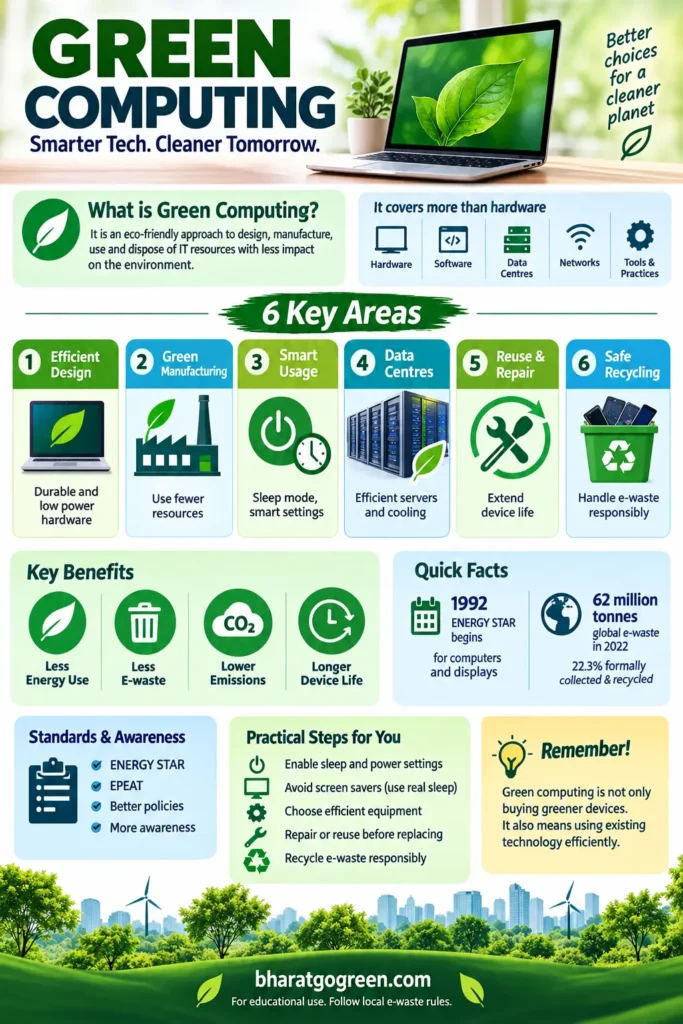
Green Computing is a sustainable approach to the design, manufacture, use and disposal of computers, servers, storage systems, networks, software and other IT resources so that their impact on the environment can be reduced.
In simple words, Green Computing means getting the required computing work done while using less electricity, hardware and natural resources.
But do you think Green Computing is only about saving electricity?
The answer is no as it goes much beyond that.
It also includes efficient software, longer equipment life, proper recycling, better use of servers and reducing unnecessary use of computing resources.
You may ask, how much does the digital sector actually contribute to global greenhouse gas emissions?
There is no single exact number. The International Telecommunication Union estimates that the ICT sector contributes around 1.5% to 4% of global greenhouse gas emissions.
The number varies because different studies include different equipment, data centers, networks and lifecycle emissions.
What are some simple examples of Green Computing?
Let us understand it with a few real life examples.
- Your laptop goes into sleep mode when you are not using it instead of consuming full power unnecessarily.
- An office continues using a perfectly working computer instead of replacing it every two or three years just because a newer model is available.
- A data center improves server utilization and cooling efficiency so that the same computing work can be done with less electricity.
- Software is designed to complete the same task while using fewer computing resources.
- An old computer is repaired, upgraded, donated or refurbished instead of directly becoming electronic waste.
- When a computer reaches the end of its useful life, it is sent through a proper electronic waste recycling channel instead of being thrown away with normal household waste.
Hence, Green Computing is not one particular technology.
It is a way of thinking about the complete digital lifecycle, starting from design and manufacturing and continuing through usage, repair, reuse and final disposal.
The basic idea is simple.
Use technology efficiently, keep useful equipment for as long as reasonably possible and avoid unnecessary energy and material waste.
More to Read!
What is Solid Waste Management [Sources & Disposal Methods]
What is Global Warming | Cause, Effect & Control [An Essay]
History of Green Computing
Let us take you back to the early 90s era when computers were big and power intensive.
At that time, energy management was also not as advanced as it is today. Computers and monitors could remain active for a long time even when nobody was using them.
So, what changed?
A major step came in 1992 when the U.S. Environmental Protection Agency launched the ENERGY STAR programme.

Computers and monitors were among the first products covered under this programme.
Over time, features such as display sleep, system sleep and automatic power management became common in computers.
Do these small features really save energy?
Yes, they do.
According to ENERGY STAR, certified computers today use about 30% to 40% less energy than standard models.
This is possible because of efficient components and better management of power when the computer is idle.
But Green Computing has also changed with time.
Earlier, the discussion was mostly about computers, monitors, printers and electricity consumption.
Today, it also includes data centers, cloud computing, software efficiency, AI, cooling and electronic waste.
So the basic idea remains the same, but its scope has become much wider.
Why is Green Computing Important Today?
Information technology has drastically improved our work and life, but every digital service has a physical side that we often do not see.
Your laptop needs materials to manufacture it. A server needs electricity to run. A data center needs cooling. And one day, every device reaches the end of its useful life.
Do you know how much electricity data centers use?
According to the International Energy Agency, data centers consumed about 415 TWh of electricity in 2024. This was around 1.5% of global electricity consumption.
Now think about the millions of computers, servers and other electronic devices being replaced every year.
Where do all these old devices go?
This is where the e waste problem starts.
According to the Global E waste Monitor 2024, the world generated about 62 million tonnes of e waste in 2022.
Only 22.3% was documented as formally collected and recycled in an environmentally sound manner.
If the present trend continues, global e waste may reach about 82 million tonnes by 2030.
Improper recycling can make the problem even worse.
The World Health Organization explains that unsafe e waste recycling can expose people and the environment to harmful substances such as lead, mercury and cadmium.
So Green Computing is not only about reducing your electricity bill.
It is also about using equipment efficiently, extending its useful life, reducing unnecessary replacement, choosing better materials and recycling electronic waste safely.
That is why Green Computing has become more important today than it was when the idea first started.
What About AI and Data Centers?
You may be thinking, does AI make Green Computing more important?
The answer is yes.
AI does not work only on your laptop or mobile phone. Behind every AI search, image, or video, there are powerful servers working inside data centers.
These servers need electricity and they also generate heat, which means additional energy is required for cooling.
The International Energy Agency reported in April 2026 that electricity demand from data centers increased by 17% during 2025.
It expects global data center electricity consumption to increase from around 485 TWh in 2025 to about 950 TWh by 2030.
But does this mean AI will always consume more and more electricity for every task?
Not exactly.
The IEA also says that electricity use for each AI task is falling rapidly as software and computer hardware become more efficient.
Still, there is another side to it.
Think about a fuel efficient car that is driven much farther every year.
It may consume less fuel per kilometer, but the total fuel consumption can still increase because it is being used more.
The same thing can happen with AI.
So modern Green Computing is not only about making one computer energy efficient.
It is also about efficient software, servers, cooling systems, data centers and the electricity used to run them.
How Computing Affects the Environment at Different Stages
Green IT is not only about the electricity used by your computer. Environmental impact starts much earlier, from raw material extraction and manufacturing, and continues until the device is reused or recycled.
So, where does this impact actually occur?
Have a look at this simple table.
| Lifecycle stage | Environmental issue | Simple example | Better practice |
|---|---|---|---|
| Design | Poor design can increase energy and material use. | Two devices may do the same work, but one may consume more power. | Design products for better energy efficiency, longer life and easier repair. |
| Manufacturing | Chips, batteries and other components require energy, water and raw materials. | A new laptop creates an environmental impact even before you switch it on. | Use efficient manufacturing methods, recycled materials and safer materials. |
| Daily Use | Computers and monitors consume electricity and produce heat. | Leaving a desktop and monitor running when nobody is using them wastes electricity. | Use sleep mode, power management and a suitable screen brightness. |
| Software and Data | Inefficient software may require more processing, storage and data transfer. | An application may continue using computing resources even when you do not need them. | Use efficient software and avoid unnecessary processing and data storage. |
| Data Centres and Cloud | Servers consume electricity and also produce heat that needs cooling. | Your online videos, cloud files and AI services run on physical servers somewhere. | Improve server efficiency, cooling and the source of electricity used. |
| Repair and Reuse | Replacing working equipment too early creates more electronic waste. | Why buy a new laptop if the old one only needs a battery or storage upgrade? | Repair, upgrade, reuse or donate the device when practical. |
| End of Life | Improper disposal can waste useful materials and release harmful substances. | Throwing an old computer into normal household waste is not the right option. | Send electronic equipment to an authorized collection or recycling facility. |
So, what is the main point here?
A computer does not become green just because it consumes less electricity.
We have to look at its complete life cycle, starting from design and manufacturing and continuing through usage, repair, reuse and finally recycling.
How Green Computing Can Reduce Environmental Impact 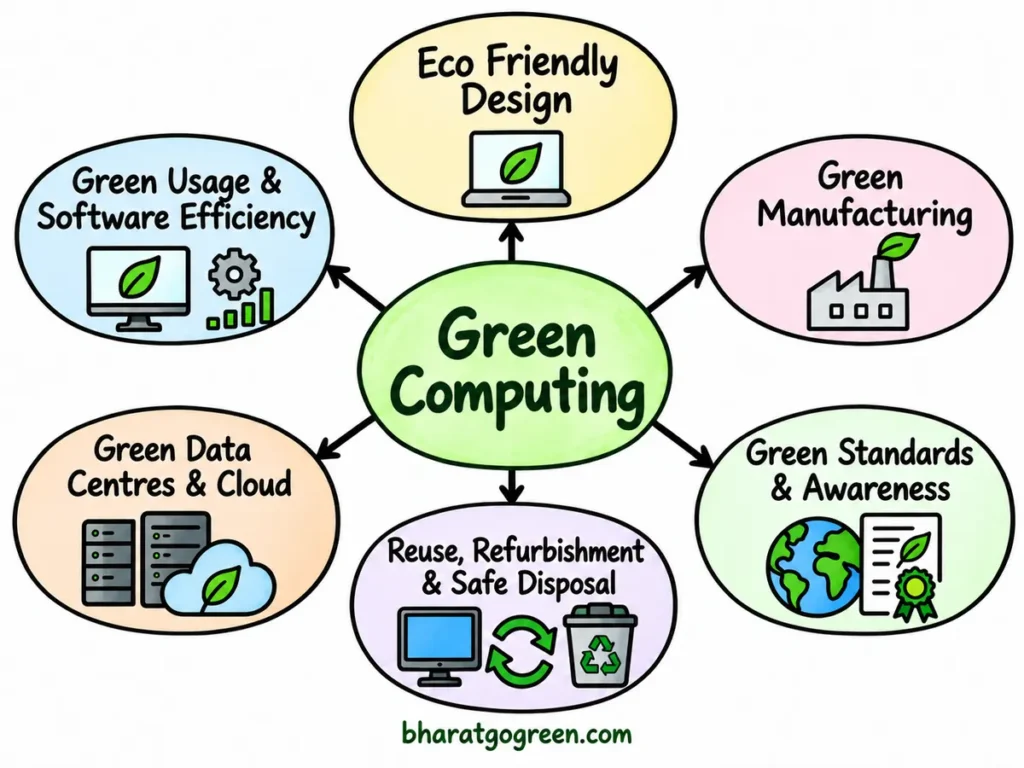
Green Computing can be understood through a few practical approaches.
You do not need to apply everything at once. Even a small change in the way we design, use or dispose of computing equipment can make a difference.
1. Eco Friendly Design
The first step is to design computers and electronic equipment that use less energy, last longer and are easier to repair or recycle.
Why does product design matter?
Suppose your laptop is working properly but its battery has failed. If the battery can be replaced easily, you may continue using the same laptop for a few more years.
But if the product is difficult to repair or upgrade, you may be forced to replace the complete device.
That means more electronic waste and another new device to manufacture.
2. Green Manufacturing
Green Computing also starts before a computer reaches your home or office.
Better material selection, efficient manufacturing processes and reduced use of hazardous substances can lower the environmental impact during production.
Manufacturers can also reduce waste by using recycled materials and designing products that can be dismantled more easily at the end of their useful life.
3. Green Usage and Software Efficiency
What can you do after buying a computer?
This is probably the easiest part.
Green usage means reducing unnecessary electricity consumption. Power management, sensible screen brightness and avoiding unnecessary background applications are simple examples.
Efficient software also matters. If software keeps the processor busy without any useful work, the computer consumes more electricity and generates additional heat.
For example, have you ever left many applications running even when you are not using them?
Closing unnecessary programs is a very small step, but it reduces unnecessary computing work.
4. Green Data Centers and Cloud Computing
Cloud computing sounds invisible, but your data is still stored and processed in physical data centers.
The ITU and World Bank Green Data Centres guide explains several ways to improve data center sustainability, including efficient cooling, better server utilization and responsible use of energy and water.
So, is moving everything to the cloud automatically greener?
The answer is no.
The result depends on server utilization, electricity source, cooling design and how much data you actually store and process.
A well utilized data center may use computing resources more efficiently than many poorly utilized individual servers.
But cloud storage still needs servers, electricity, networking equipment and cooling.
5. Reuse, Refurbishment and Safe Disposal
Instead of immediately discarding a computer, you can ask one simple question.
Can it still be repaired, upgraded, reused or refurbished?
Sometimes a computer does not need complete replacement. Adding memory, replacing a battery or upgrading storage may extend its useful life.
Keeping useful equipment in service can delay waste generation.
But what should you do when the device truly reaches the end of its useful life?
It should go through responsible e waste collection and recycling instead of being mixed with normal household waste.
6. Green Standards and Awareness
Standards help buyers to compare products and help organizations measure efficiency.
ENERGY STAR is one example for energy efficient computers and other electronic equipment.
For data centers, measures such as Power Usage Effectiveness, commonly called PUE, help operators understand how much facility energy is being used compared with the energy used directly by IT equipment.
Water Usage Effectiveness, or WUE, helps measure water use in data center operations.
But standards alone cannot make computing sustainable.
Users, companies, manufacturers and data center operators must also understand why these measures are important and use them properly.
That is where green awareness becomes equally important.
Green Computing in India
Green Computing is becoming more relevant in India because our digital infrastructure is expanding quickly.
Just think about how many digital services we use every day. We make online payments, store photos on the cloud, watch videos, use AI tools and access government services online.
But where does all this data go?
A large part of it is processed and stored in data centres. These facilities need electricity not only to run servers but also to keep them cool.
According to the Press Information Bureau (2026), India’s data centre capacity and associated electricity demand are growing rapidly.
India had around 375 MW of installed data centre power capacity in 2020. By August 2026, it had increased to about 1.57 GW.
The Government of India also cited a Central Electricity Authority estimate that data centre power demand could reach around 17 GW by 2031 to 2032.
So, what does this mean?
As data centres become bigger, saving electricity and water becomes more important.
India already has standards that look at Power Usage Effectiveness, Carbon Usage Effectiveness, Cooling Efficiency Ratio and Water Usage Effectiveness.
You do not need to remember all these technical terms.
In simple words, these indicators tell us how efficiently a data centre is using electricity, cooling and water.
Green Computing in India is also connected with e waste. The E Waste (Management) Rules, 2022 came into force on 1 April 2023 and provide the main framework for managing covered electronic waste in the country.
These rules have also been amended from time to time.
So Green Computing is no longer limited to switching off a computer when it is not required.
It is becoming part of how India designs and manages its growing digital infrastructure.
Sustainable Computing: Advantages & Disadvantages
Advantages of Green Computing
You may ask, what do we actually gain by adopting Green Computing?
Let us understand it with some simple examples.
- Green Computing can reduce electricity consumption. If a computer, server or data centre performs the same work using less electricity, its operating cost can also come down.
- Efficient equipment produces less unnecessary heat. This can also reduce the amount of energy required for cooling.
- Repairing, reusing and refurbishing electronic equipment can increase its useful life and reduce e waste generation.
- Better material selection and proper recycling can help recover useful materials instead of sending old electronic equipment for unsafe disposal.
- Efficient software can also make a difference. If the same work can be completed with fewer computing resources, less processing capacity may be wasted.
- Green standards can help companies compare computers, servers and other IT equipment before purchasing them.
- Most importantly, Green Computing allows us to continue using digital technology while trying to reduce its environmental impact.
Does it mean that every green technology will automatically save money and energy?
Not always.
That brings us to its limitations.
Disadvantages of Green Computing
Green Computing also has some practical challenges.
- Some energy efficient equipment and better cooling systems may require a higher initial investment.
- Measuring the actual environmental benefit is not always easy. A computer may consume less electricity during use, but its manufacturing and replacement also have an environmental impact.
- Higher efficiency does not always mean lower total consumption. For example, if each server becomes more efficient but the number of servers increases very quickly, total electricity consumption can still rise.
- Cloud computing and data centres also involve choices between electricity consumption, water use, reliability and cost. Moving data to the cloud does not automatically make it green.
- Should we continue using an old computer forever just to avoid buying a new one? Again, the answer is no. Very old equipment may consume more power and may no longer meet performance or security requirements.
So the better question is not simply, “Which technology is green?”
We should ask, “Which option provides the service we need with the lowest practical environmental impact throughout its useful life?”
How You Can Support Green Computing?
We can make small changes at our end that will help in reducing the burden on our environment.
But where should you start?
Do you need to replace your computer or buy expensive new equipment to support Green Computing?
No. In many cases, using your existing equipment wisely is the better place to start.
- When buying a new computer, look for an energy efficient certified model such as an ENERGY STAR certified computer.
- Enable sleep mode and power management features. Why keep a computer running at full power when nobody is using it?
- Keep the screen brightness at a comfortable level instead of using maximum brightness all the time.
- Use sleep mode when you are taking a short break. If the computer will not be required for a long time, you can hibernate or shut it down.
- Do not replace a properly working computer only because a newer model is available. Manufacturing a new device also requires energy and raw materials.
- Is your computer becoming slow? Before replacing it, check whether a memory or storage upgrade can extend its useful life.
- Do not discard a usable computer. Donate, reuse or refurbish it wherever possible.
- If the equipment has reached the end of its useful life, send it through an authorized or reliable electronic waste recycling channel.
- Print only when required. Use both sides of the paper wherever possible and review drafts on the screen before printing.
- Buy hardware according to your actual requirement. For example, there is little benefit in buying a very powerful computer if you only use it for email, browsing and basic office work.
- Do not assume that storing everything on the cloud is automatically greener. Cloud data is also stored in physical data centres. Keep the files you really need and remove unnecessary duplicate data.
- Look around your office. Are printers, scanners, monitors or other peripherals remaining switched on even when nobody is using them? Turn them off when they are not required.
Does this look like too much work?
Don’t worry, you cannot go after each issue at once.
Start with one or two changes that are easy for you. Once they become normal practice, move to the next.
Sustainable Computing FAQs
Is cloud computing always greener than storing data locally?
No. Cloud services can improve resource utilization, but they still run on physical data centers. The result depends on facility efficiency, electricity source, cooling and how much you use.
Should I shut down my computer every night?
For a short break, sleep mode is convenient. If the computer will not be needed for a long period, hibernate or shut it down. The main point is not to leave an unused computer fully active without a reason.
Should I replace an old computer with a new energy efficient one?
Not always. If a repair or simple upgrade keeps a device useful, that may be a better option. Replacement makes sense when the old system no longer meets safety, security, performance or reasonable efficiency needs.
Do AI tools make Green Computing impossible?
No. AI increases computing demand, but efficiency is also improving. The challenge is to improve software, chips, data centers, cooling and electricity supply while avoiding unnecessary computing work.
Do data centers always consume huge quantities of water?
No. Water use depends on the cooling system, climate and facility design. Some systems use more water while others use closed loops or different cooling methods.
Conclusion
Green Computing started with a simple idea of making computers more energy efficient, but today its scope is much wider.
It now covers hardware, software, data centers, cloud services, AI, electricity, cooling, water, repair, reuse and e waste.
Does that mean every user needs to understand all these technologies?
Not at all.
For most of us, Green Computing still starts with simple decisions. Use efficient equipment, enable power saving, keep devices useful for longer, avoid unnecessary consumption and recycle electronics responsibly.
For organizations, the same idea works at a larger scale. Measure what you use, remove waste and choose technology according to actual need.
Now it’s our turn, we must understand the importance of green computing and work collaboratively for a healthier and greener environment for our future generations.
References
- International Energy Agency. (n.d.). Data centre electricity use surged in 2025.
- International Telecommunication Union. (n.d.). ICT sector emissions.
- International Telecommunication Union, & United Nations Institute for Training and Research. (2024). The Global E waste Monitor 2024.
- International Telecommunication Union, & World Bank. (n.d.). Green data centres guide.
- Ministry of Environment, Forest and Climate Change, Government of India. (2022). E Waste Management Rules, 2022.
- Press Information Bureau, Government of India. (2026, September 14). Data centres in India.
- U.S. Environmental Protection Agency, ENERGY STAR. (n.d.). Computers.
- U.S. Environmental Protection Agency, ENERGY STAR. (n.d.). ENERGY STAR programme history.
- World Health Organization. (n.d.). E waste and health.
- Harnessing Green IT, Principles & Practices by San Murugesan & G.R. Gangadharan, Wiley Publication
- Kontagora, Ibrahim. (2017). GREEN COMPUTING: TECHNOLOGIES, APPLICATIONS, AND CHALLENGES.
- Tiwari, Shobhit. (2011). Need of Green Computing Measures for Indian IT Industry. Journal of Energy Technologies and Policy. 1. 18-24.




I’m amazed, I have to admit. Rarely do I encounter a blog that’s both educative and engaging, and without a doubt, you have hit the nail on the head. The problem is something too few folks are speaking intelligently about. I’m very happy I found this in my hunt for something regarding this.
Thanks, keep visiting